
Keyword Weight: Why Niche Keywords Win in Stock Search
Your shoot has more true keywords than any photo has room for. Why similar frames compete, how keyword weight works, and how a buyer angle per photo fixes it. Real numbers from 635 photos.

Every shoot has more true keywords than any single photo has room for. In one wine tasting shoot of 188 photos we counted 197 different keywords that were true for at least one frame. A photo carries about 25 of them, and agencies cap the list at around 50.
So the real question is not how many keywords to use. It is which words go on which photo. That decides who finds each frame, and whether your frames help each other or compete.
Why not put every true word on every photo?
Because then every photo waits for the same searches.
Take a real series: 39 photos of the same woman on the same balcony, same chair, same morning. Across the folder there are 79 true keywords. If all 39 frames carried all 79, every search that finds the series would find all 39 frames. The buyer picks one. The other 38 lose that search, every time.
In the actual metadata, it looks different:
- 8 keywords are on all 39 frames: the who and the where.
- The average keyword is on 12.6 frames, not 39.
- Half of the keywords are on 5 frames or fewer.
Same shoot, same model, same morning. But a buyer searching for most of those words meets a handful of these frames, not the whole series.
There is a second reason. Even if you wanted to, the words don't fit. 79 true words don't fit into 50 slots, and the wine tasting's 197 certainly don't. Something has to be chosen for each frame either way. The only question is whether you choose on purpose.
Shuffling doesn't get around this. Reordering the same keywords or swapping in a synonym doesn't change which searches a photo competes in. Fifteen near-identical frames with the same words in a different order still land in the same searches.
One scene, many buyers
Creators often decide what a scene is for, and that's it: a wine tasting is “wine tasting”, a balcony morning is “coffee on a balcony”. The content almost always fits more categories than that.
Here is how the 188 photos of the wine tasting spread across concepts. The counts are real; the buyers in the last column are our reading of who searches for that concept.
| Concept keyword | Photos with it | Who might be searching |
|---|---|---|
| expertise | 95 | wine producers, sommelier schools, expert services |
| Active Seniors | 64 | retirement, senior living, health insurance |
| social gathering | 53 | hospitality, event venues, tourism |
| education | 43 | courses, workshops, e-learning |
| Quality Control | 14 | wineries, production, quality campaigns |
| fine dining | 13 | restaurants and hotels |
| celebration | 6 | events, greetings, party campaigns |
One shoot, seven kinds of buyer. The balcony series spreads the same way: Self Care on 12 frames, reading on 14, coffee break on 14, Staycation on 5, City Life on 5, Mental Health on 5. Three real titles from it:
- Relaxed Young Woman Holding Coffee Cup While Practicing Daily Self Care on Balcony
- Woman Reading a Book on Balcony While Savoring a Lazy Day
- Young Caucasian Female Enjoying the City View While Holding a Coffee Cup on Balcony
The buyer angle: one frame, one buyer
That is the idea behind a buyer angle. Each frame gets the angle it supports best, and each angle points at a different buyer. The frame where she reads goes to the lazy-day and reading searches. The frame where she looks over the city goes to city life and staycation. The frame where she sits back with her coffee goes to self care.
Two rules keep it honest:
- Only angles the frame really supports. If a frame doesn't show it, the word doesn't go on it. A misleading angle brings the wrong buyers.
- Pick the angles buyers actually search. An angle is only useful if real buyers type it. That is why the choice should come from how buyers search and who ends up buying, not from what sounds creative.
Your pixel searches don't go away
A common worry: if this frame is about self care, does it still show up for “woman on balcony”?
Yes. The shared facts stay on every frame: the who, the where, the objects. Every frame still competes in the basic “pixel” searches, the ones that describe what is visible. In our four shoots, between 53 and 67 percent of all keyword slots hold words that appear on at least half of the shoot's photos. That shared base is what keeps every frame in those searches.
But in a pixel search you compete with every similar photo on the site, and there are thousands. The order there is decided mostly by the agency's own ranking and the quality signals it keeps for each file, which you can't influence. The angle searches are smaller, and in them your frame is not just one more match. It is the strong match, because its title, description and keywords all say the same thing.
Positioning: title, description and keywords on one topic
Positioning a frame means that all three fields carry the same angle. Search matches the buyer's words against all three, so when they agree, the frame lands clearly in one niche. A real example from the balcony series:
- Title: Relaxed Young Woman Holding Coffee Cup While Practicing Daily Self Care on Balcony
- Description: A young Caucasian woman practices daily self-care on her balcony, holding a coffee cup with saucer. She sits comfortably on a wicker chair draped with a sheepskin throw, enjoying a peaceful morning moment in natural light.
- Concept keywords: Self Care, Me Time - Concept, Mindfulness, Life Balance
- Facts: Balcony, coffee cup, and the rest of the shared base
The concept keywords circle the one topic of the title. That is what makes the frame a strong answer to “self care” searches, instead of a weak answer to everything. More on writing those fields in How to write stock photo titles and descriptions.
How keyword weight works
Why does a focused, specific word do more than a generic one? No agency publishes its ranking formula, and real ones combine many signals beyond the text. But almost every text search engine builds on the same few ideas: rarity, fit, prominence and focus.
Rarity
The classic way to measure how much a word tells search is called inverse document frequency. In plain terms:
weight = ln(all photos ÷ photos with the word)
A word on every photo gets ln(1), which is zero. A word on one photo in a hundred gets ln(100), about 4.6. Here it is applied to the 188-photo wine tasting, treated as a small library:
| Keyword | Photos with the word | Weight |
|---|---|---|
| Wine Cellar | 188 of 188 | 0.0 |
| expertise | 95 of 188 | 0.7 |
| Corkscrew | 14 of 188 | 2.6 |
| Celebratory Toast | 1 of 188 | 5.2 |
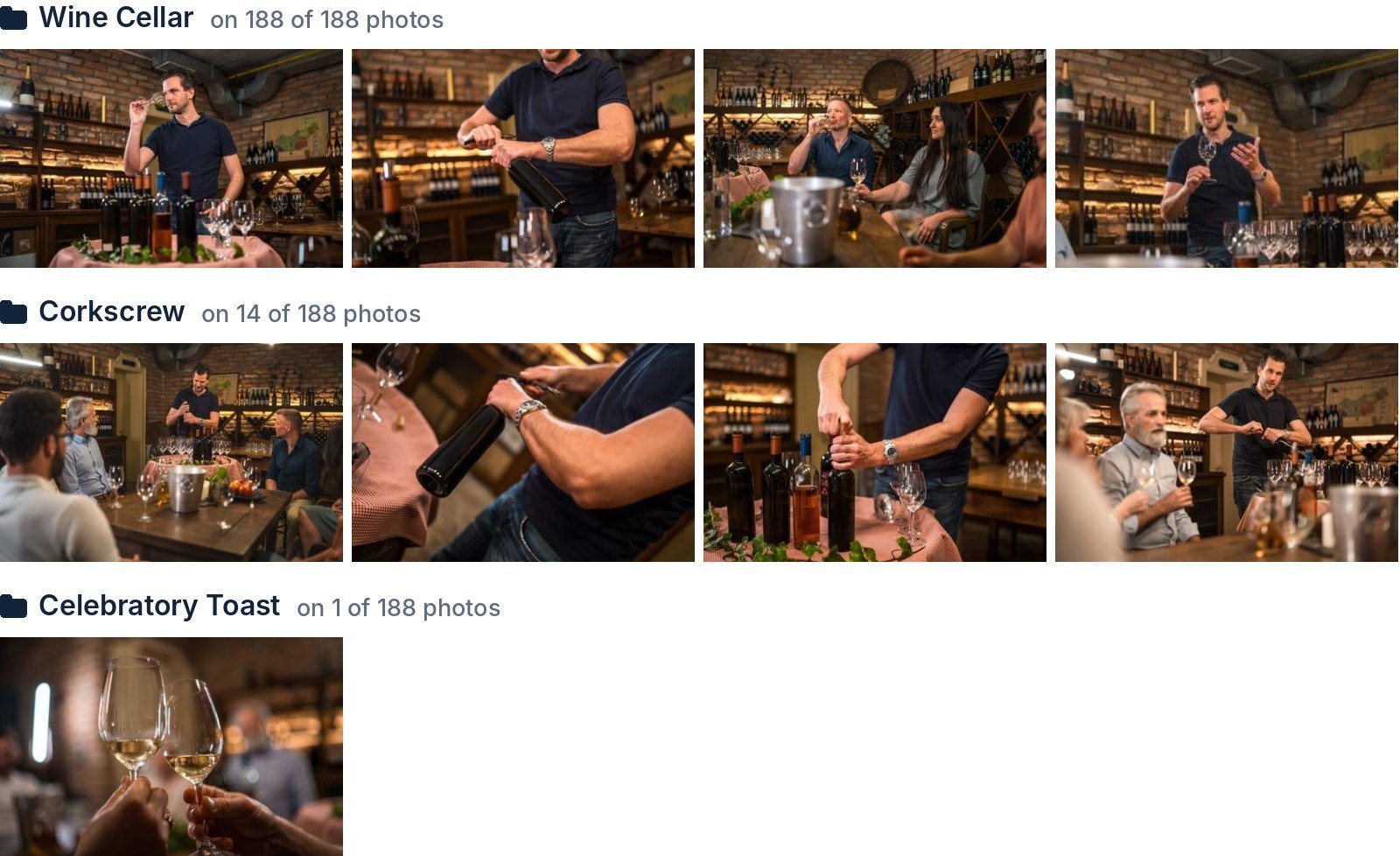
Which photos carry each keyword. Photos: azmanl
“Wine Cellar” is true for every photo, so inside this shoot it can't lift any of them above the others. That doesn't make it a bad keyword: it gets all 188 photos into wine cellar searches in the first place. It just can't decide the order once they are there.
Weight depends on the library
Put our four shoots together, 635 photos of a wine tasting, a rooftop spa, friends gaming at home and the balcony, and the same words weigh differently:
| Keyword | Photos with the word (of 635) | Weight |
|---|---|---|
| Adults Only | 624 | 0.0 |
| Relaxation | 407 | 0.4 |
| Self Care | 233 | 1.0 |
| Wine Cellar | 188 | 1.2 |
| Mindfulness | 107 | 1.8 |
| Hot Tub | 91 | 1.9 |
| coffee cup | 40 | 2.8 |
| Hydrotherapy | 20 | 3.5 |
| Corkscrew | 14 | 3.8 |
| Celebratory Toast | 1 | 6.5 |
“Wine Cellar” weighs zero inside its own shoot and 1.2 in the bigger library. On a stock site with millions of files it is a niche word compared with “adults” or “indoors”. But once a buyer types it, every result contains it, and from that moment it stops separating them. What decides the order is the rest of the search.
Fit
Buyers rarely type one word. In the wine tasting shoot, “wine cellar” matches all 188 photos. “Wine cellar corkscrew” matches 14, and those 14 move ahead. “Wine cellar celebratory toast” matches one photo, and it goes first. Every true, specific word on a frame is one more multi-word search where that frame can be the best match instead of one of hundreds.
Prominence
The title and the description are searched too, and some engines give the title extra weight. Some agencies also say the first keywords count most; others ignore keyword order. Either way, the angle belongs in the title and at the top of the keywords.
Focus
Many text search engines normalise for length: a match in a short field counts a little more than the same match in a long one. A simplified way to picture it: if a photo has 100 points of relevance to share, 50 keywords get about 2 points each and 25 keywords get about 4. The real formulas are less tidy, but the direction holds: every off-topic keyword thins out the ones that carry the angle. Our four shoots average between 24.9 and 26.8 keywords per photo.
Rare is not the goal. True and searched is.
“Celebratory Toast” weighs 6.5 in our library because exactly one photo has it. That only helps because buyers search for toasts. A rare word nobody searches has a high weight and no effect. A rare word that isn't true brings the wrong buyers, and a wrong keyword makes the whole set less trustworthy.
Checklist
- Write the facts once. The who, where and what of the shoot go on every frame. They keep you in the pixel searches.
- List the buyers the shoot can serve. Not just the obvious one: think education, seniors, hospitality, wellbeing, travel.
- Give each frame one angle it really supports. Spread the angles across the series so frames don't fight for the same buyer.
- Position each frame. Title, description and concept keywords all around that one angle.
- Add the specific nouns. Corkscrew, hot tub, coffee cup: the words a buyer adds to narrow a search.
- Cut what is off-topic, untrue or unsearched. Stop when the words stop being true, usually around 25.
How we counted
The numbers come from four shoots processed in Stock ImageIQ in October 2026: a wine tasting (188 photos), a rooftop spa (199), friends gaming at home (169) and a balcony morning routine (79, of which the series above is 39). Weights use the natural logarithm. They show the principle on a small library; a stock agency's search works on millions of files and combines more signals, and its exact formulas are not public. The buyer column in the concept table is our reading, not data.
Stock ImageIQ chooses a buyer angle for every photo in a series, based on which search phrases buyers actually use and who ends up buying, then writes the title, description and keywords around it. Try it on your next shoot.
Read next: Same keywords on every photo? Your series is competing with itself