
What Stock ImageIQ Is: One Shoot, Every Aisle
One city bike shoot, 102 frames, five aisles. How Stock ImageIQ places every frame where its buyer is already searching, the way a shop shelves one product in several places.
Stock ImageIQ writes titles, descriptions and keywords for stock photos and videos. That's what it does. What it is, is a positioning tool: it decides where in search each frame of your shoot belongs, and writes the metadata that puts it there.
If you read Positioning, Not Luck, this is the same idea without the equations, shown on one real shoot.
One toothpick, three aisles
In a big supermarket you'll find toothpicks in more than one place: next to the wooden spoons, in the picnic aisle by the paper plates, and at the meat counter by the skewers and charcoal. Same box, three shoppers who would never meet in one aisle.
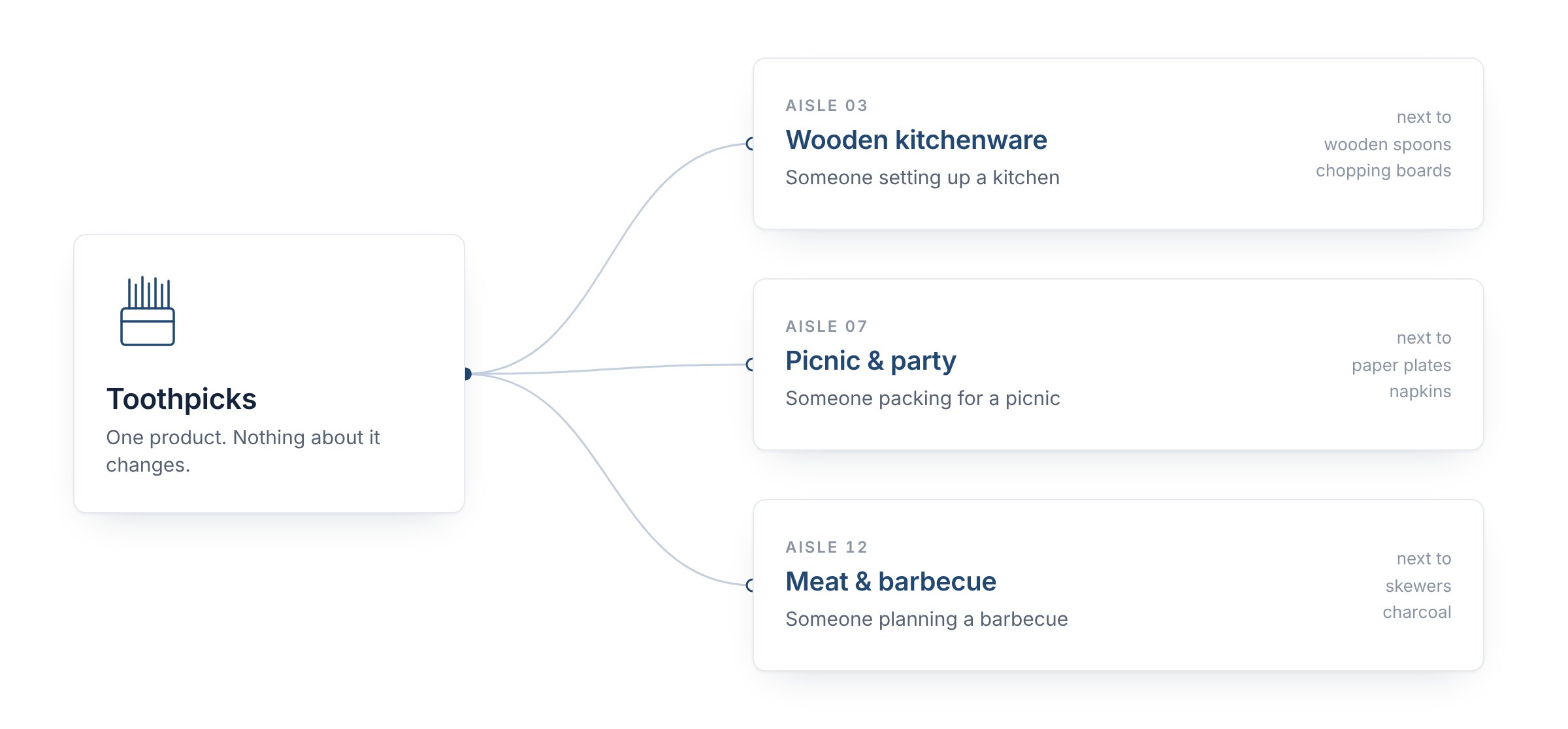
Same product, three aisles, three shoppers. Illustration.
The toothpick doesn't pretend to be anything else. It's simply placed where each shopper already is. Stock search works the same way. The aisles are searches, and the shelf label is your title, description and keywords.
Now picture the opposite. The shop keeps every box in one spot on one shelf. A shopper sees the box at the front and takes it. The boxes behind it are the same product, and nobody ever reaches for them. A shoot with one keyword list copied onto every frame is that stack: one frame makes it to the front of the search, and the rest of the shoot stays hidden behind it. The agencies say as much. Adobe Stock warns that too many similar submissions "can reduce the visibility of your creative work", and reads different images with identical titles and keywords as serving "the same customer need". Shutterstock says the same keywords across a series "could actually hurt your sales potential".
One shoot, mapped like a shop
Recently we processed a city bike shoot: one woman, one bike, one city, one day, 102 frames. The photographer's brief was two lines: a woman commuting, maybe going to work, maybe just cycling, but not as a sportsperson.
On a contact sheet it looks like 102 versions of the same picture. Sort the frames by what is actually happening in them, and it turns out to be five different products:
| What's in the frame | Frames | The aisle | Buyer angles inside it (examples) |
|---|---|---|---|
| Riding through traffic, bike lanes and crosswalks | 35 | Commuting and city transport | the ride to work · sharing the road · everyday city life · room for a headline |
| A phone in her hand, the bike beside her | 40 | Phones on the go | staying connected · technology in everyday life · a smile at the screen |
| Checking her smartwatch | 9 | Wearables and keeping time | time management · wearable tech |
| A pause: a bench, a laugh, leaning on the handlebars | 12 | A break in the city | taking a break · laughter and joy |
| Details: the pedals, a helmet strap, a bike lock | 6 | Bike gear and safety | road safety · bike security · cycling gear |
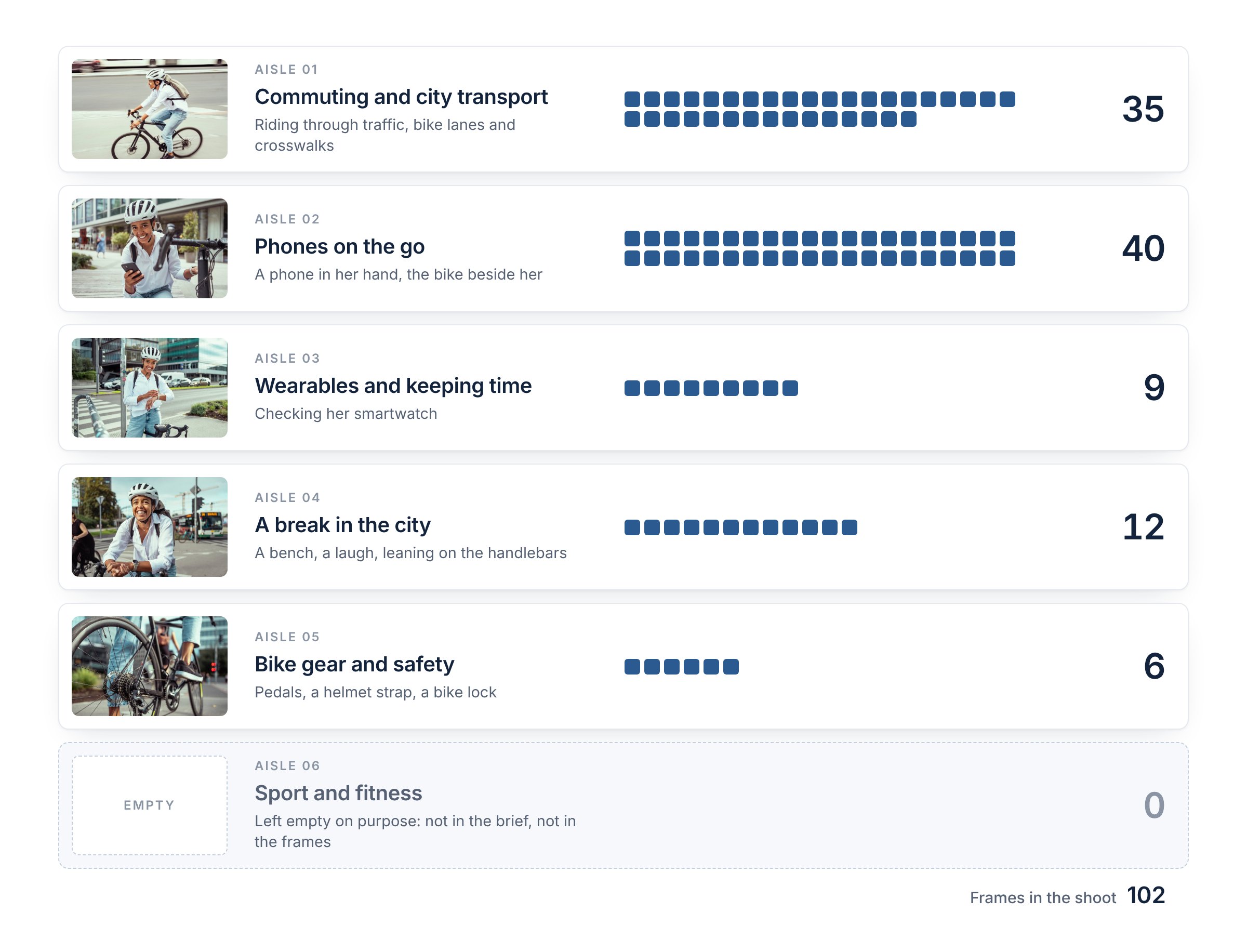
Each square is one frame of the shoot, sorted by hand by what happens in it. The sixth aisle stays empty on purpose. Photos: sanjeri
Keyword all of them as "woman, bicycle, city" and you stack 102 boxes in one spot. For 35 of them it's the right shelf, but only the few at the front get seen. The other 67 are never the best picture there, and all 102 compete for the same few searches. (Why that hurts is in Same keywords on every photo?)
Positioned, the same shoot stands in five aisles. The 40 phone frames are the obvious answer for a buyer who needs a phone in a city scene, with the bike as the setting rather than the subject. The three pedal close-ups show no face at all, which is exactly what a buyer making a banner for cycling gear or a bike-lane campaign is after.
And the aisle is only half of it. Inside every aisle, each frame gets its own buyer angle. The angle isn't just what's in the picture or what she's holding: it's the reason a particular buyer would pick exactly this frame and not the one next to it.
Take the 35 riding frames. They share an aisle, but not a buyer:
- a close frame in a white shirt with a backpack is the ride to work, for an HR page about commuter benefits;
- a frame with cars and another cyclist on the same street is sharing the road, for a mobility or city-planning story;
- a frame past arched shop windows, with people walking by, is everyday city life, for a city guide;
- a wide frame with her small in the corner and open street around her is room for a headline, for a designer who needs space for text.
Each angle then gets its own concept keywords, the words that tell its story, so search can find the frame in that story: Commuter and Journey for the ride to work, Traffic and Sustainable Transport for sharing the road, City Life for the shop windows, Copy Space for the wide frame.
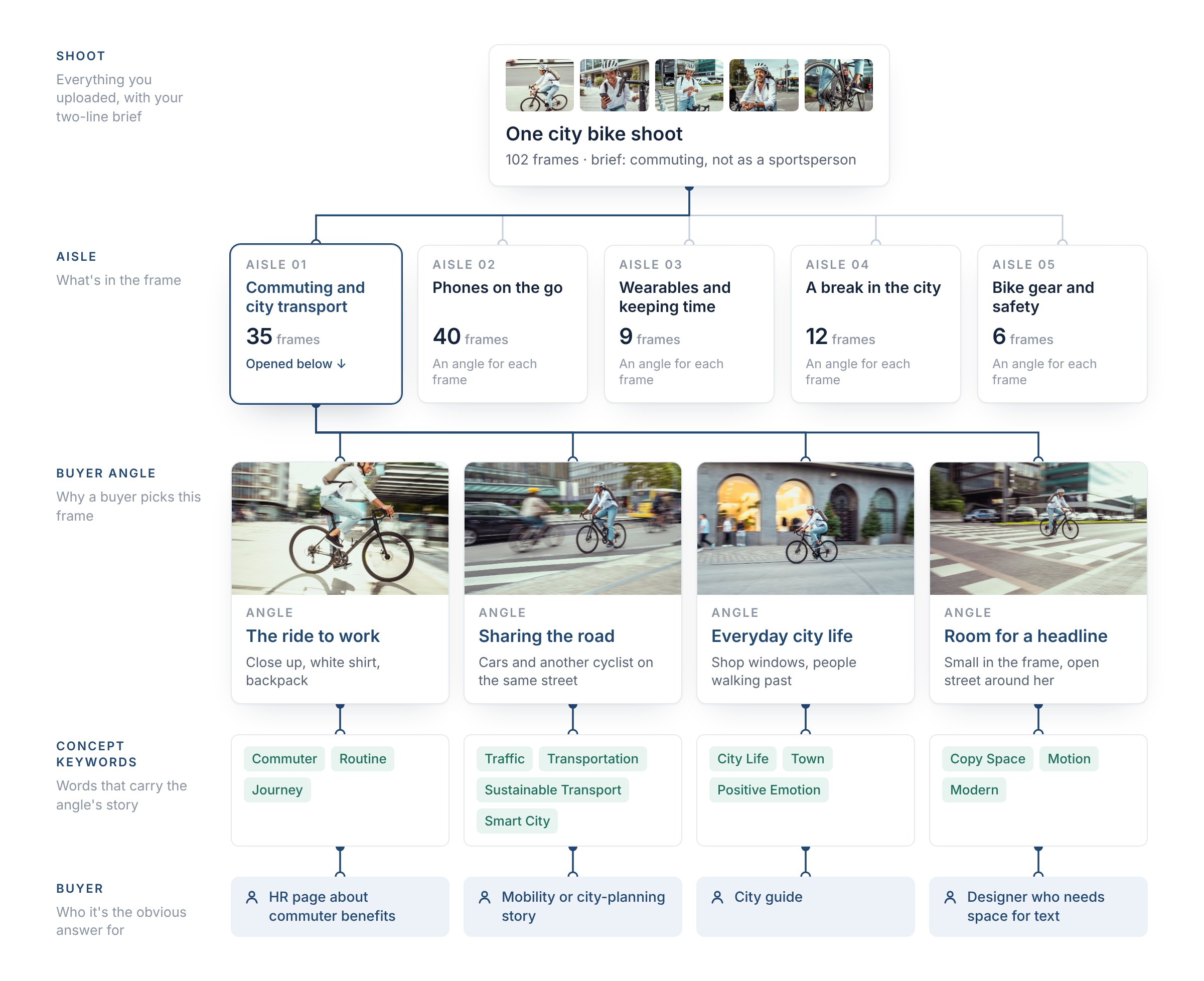
Shoot, aisle, buyer angle, concept keywords, buyer. Real shoot, frames sorted by hand; angles, keywords and buyers are examples. Photos: sanjeri
Same woman, same bike, same ride. Four buyers, and four frames that no longer stand in front of each other on the shelf. The same goes for the 40 phone frames, the 9 watch frames and the rest: every frame gets the angle that only it answers best.
The aisle we leave empty
There's a sixth aisle this shoot could be pushed into: sport and fitness. "Cycling" is a fitness word, and it's tempting to add "active lifestyle", "workout" or "staying fit" to every frame.
The brief said no, and the frames agree. She's in jeans and a white shirt, with a backpack. A buyer searching for a cycling workout opens one of these frames, sees a commute, and leaves.
That isn't just a missed sale. Adobe Stock says it plainly: padding metadata with terms the picture doesn't show "can reduce your visibility and harm your sales". So positioning has one hard rule: every aisle has to be visible in the frame or come from what you told us about the shoot. More aisles than the picture supports isn't reach. It's noise, and search punishes it.
It's SEO for your shoot
How stock search decides, in short: your text decides which searches a frame can show up in. Buyers decide the order: Shutterstock lists downloads among the factors behind its ranking, and one of its patents scores each image per keyword from purchases, clicks and lightbox adds. And buyers rarely scroll far. Adobe's search engineers wrote that buyers "don't often scroll too deep into the results", so a frame in a crowded search is never seen, while the same frame in a precise one is.
If you've ever worked on a website, you already know this game.
| A website | A shoot |
|---|---|
| One page per search intent, not one page for everything | One buyer angle per frame, not one keyword list for the whole shoot |
| Backlinks: other pages send visitors in | Every positioned frame is a door that sends buyers into the rest of the shoot |
| A page that answers its search earns the click, and the rank | A frame that's the obvious answer earns the click, and the click moves it up |
| A page stuffed with words it doesn't deliver drops | A frame shelved in the wrong aisle gets skipped, and that costs it position |
One difference: a website owner can see which search brought each visitor. A stock contributor can't.
A click is a door, not a sale
A buyer who clicks your frame doesn't land on that frame alone. The page around it shows more: other frames from the same shoot, the same model, similar pictures. Often the frame they license isn't the one they clicked.
Say an editor is writing about bike helmets and searches for a cyclist fastening a helmet strap. The shoot has two frames of exactly that, so it's found. On the page, the series strip shows the pedal close-up, and that's the one that fits the layout: no face, room for a headline. One click in the safety aisle, one licence for a frame that wasn't in that search at all.
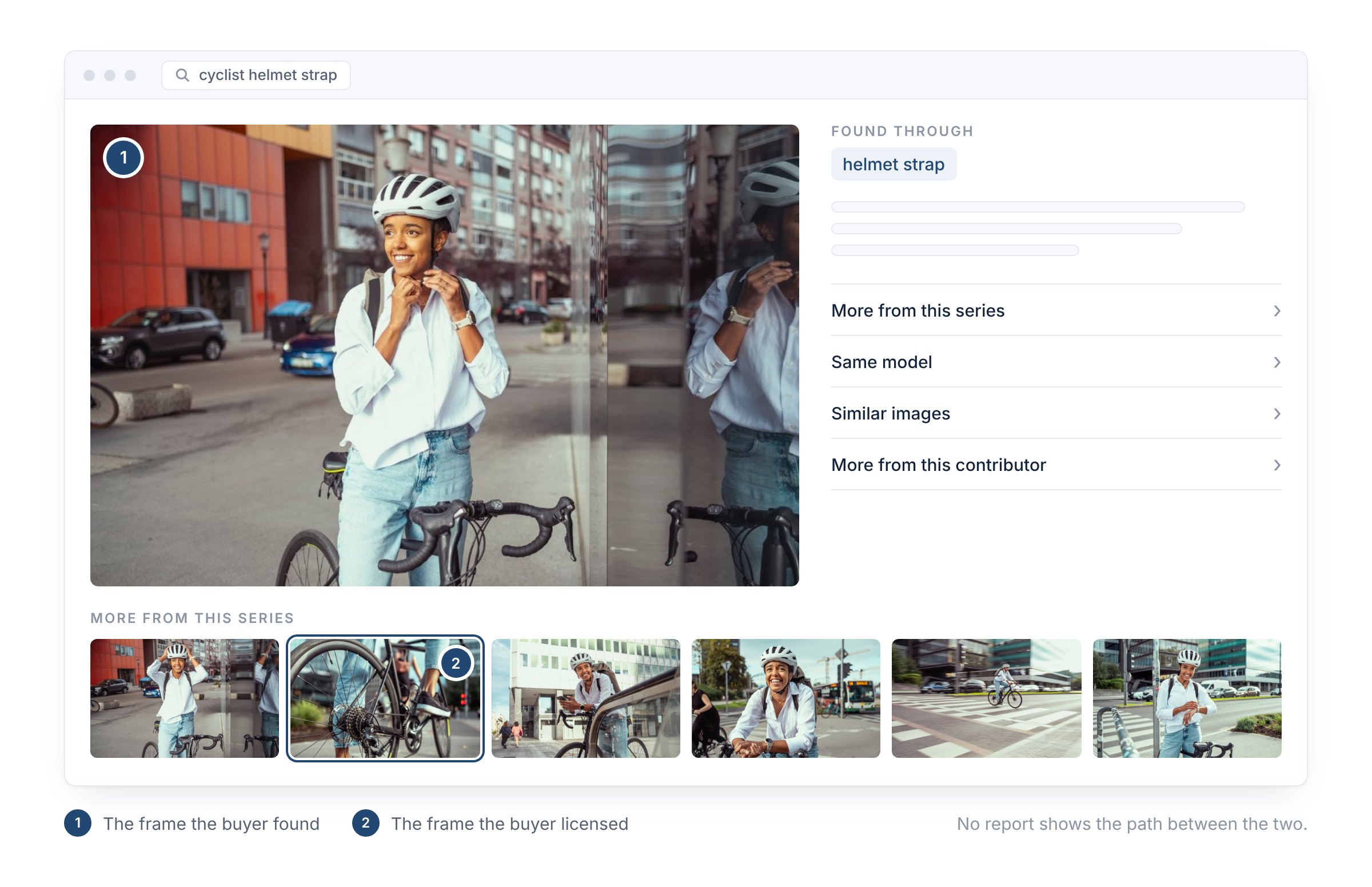
Illustration of a typical stock photo page, with real frames from the shoot. Photos: sanjeri
And nobody will tell you which way it went. Agencies report the licence. Alamy shows which search terms led to views, zooms and sales, and says itself that it can't link every sale to a search. None shows the path in between: which frame the buyer opened first, and which strip of similar or same-series images led them to the one they paid for. Every stock site runs its own similarity and suggestion systems, and you only ever see the end of the trip. One Shutterstock patent even counts a buyer's activity on other images "from the same photo shoot" as a signal of interest. A patent isn't proof of what runs today, but it shows how the agencies think about a shoot.
That's why we don't optimise single photos. We position the whole shoot, so every frame is a way in to all the others.
Ad space you don't pay for
Every honest aisle is shelf space you don't rent. You earn it, because the buyer was already standing there. A shoot in one aisle has one shelf. The bike shoot has five, and a buyer who stops at any of them can walk through to all 102 frames.
That's what we mean by reach. Not more keywords: more searches, and more combinations of search words and filters, in which the right frame of your shoot is the first thing that makes sense.
What Stock ImageIQ does with your shoot
- You give it the shoot and two lines about it: what it is, and who's in it. Folder names count too.
- It reads every frame for what's actually there: the action, the objects, the place.
- It gives every frame its own buyer angle, the reason a buyer would pick exactly that frame, so neighbouring frames don't fight for the same buyer.
- It keeps the shared facts, who and where, on every frame, so each one stays in the basic searches too.
- It writes the title, description and keywords around that angle, and leaves out the angles the frame doesn't show.
- You stay the editor: review every field, reorder the keywords, regenerate with more context, and export.
FAQ
Does every shoot get five aisles?
No. A shoot gets as many aisles as it has different moments. A product on white, shot from three sides, may honestly have one. Positioning never invents a second aisle to look busier.
Do I have to sort my shoot into folders first?
No. If you already keep folders, their names are read as context. If you don't, every frame is read on its own.
Sources: Adobe Stock: distinct content submission guidelines · Adobe Stock: maximize metadata to get discovered · Adobe Tech Blog: position bias in Adobe Stock search, 2019 · Shutterstock help: how can I maximize my visibility? · Shutterstock help: what determines order in search · Shutterstock patent US 10,409,822 · Selling Stock: Alamy Measures, 2017.
Stock ImageIQ puts every frame of your shoot in the aisle where its buyer is already looking. Try it on your next shoot.
Read next: Positioning, Not Luck: How Stock Search Turns Metadata Into Clicks · Same keywords on every photo?