
Does Your Keywording Tool Watch the Whole Clip?
In a 23-second clip, a hand goes up for two seconds. Why stock video titles, descriptions and keywords have to follow the whole clip, shown on real footage.
A stock video gets one title, one description and one keyword list for its whole length. Until a buyer presses play, those words are all that search has to work with. So the question for any clip is simple: do the words describe the clip, or one picture from it?
Two seconds in a 23-second clip
Take a clip from a real shoot, a corporate coding class. A presenter stands beside a screen full of code, a team sits around a boardroom table, and we watch through a glass wall. At 0:06, someone at the table raises a hand. By 0:09 it's down again. Two seconds out of 23.
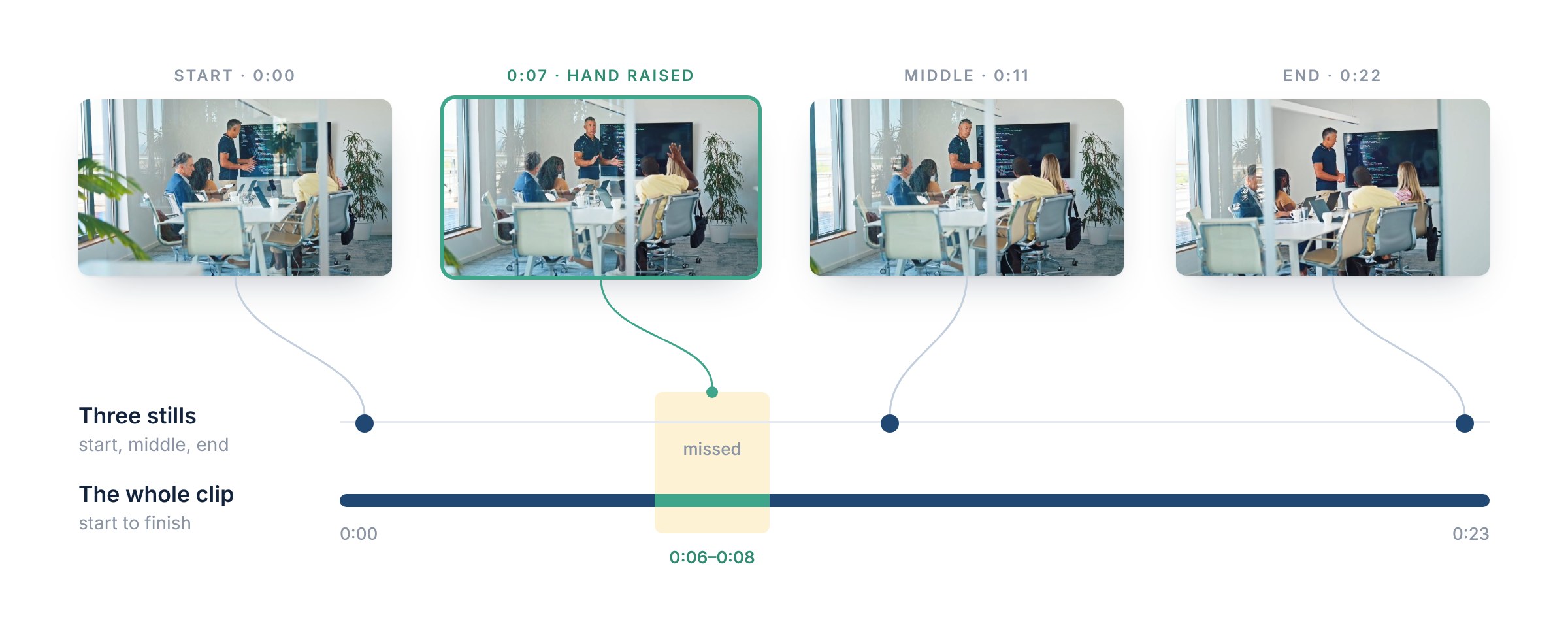
Four frames from the same 23-second clip. The start, the middle and the end show a presentation; only the frame at 0:07 shows the raised hand. Video: azmanl
Now imagine a tool that writes the metadata from a few stills, say the start, the middle and the end. Each of them is a good picture of a presentation, and none of them has the hand in it. Everything that tool writes is true for the stills it saw, and the clip is still described wrong, by omission: the question from the audience never happened.
This is the description Stock ImageIQ wrote for the clip:
Wide shot of a mature Asian male coding presenter standing beside a presentation screen while diverse businesspeople sit around a boardroom table. He gestures toward the displayed code and an audience member briefly raises a hand during the presentation.
The last clause is the two seconds. It's there because the whole clip was processed, start to finish.
Video buyers search for what happens
An editor cutting a training video has a voice-over that says "any questions?". They don't need "a presentation", they need the shot where a hand goes up. A producer opening a conference promo needs people arriving, not an empty room. In both cases, what they type into search is an action.
The agencies ask for exactly that. Storyblocks tells contributors that a footage title should name the subject "along with either what is happening and/or where it's happening", and its keyword guide puts action right next to subject and setting: "Action (jogging, typing, reading, etc)". Shutterstock asks for keywords that "relate directly to what is in the image or video". In a video, what is in it includes what it does.
A clip changes. A frame doesn't.
A photo is one moment. A clip is a stretch of time, and something in it changes: people come and go, something moves, the shot ends somewhere it didn't begin. Here is another clip from the same coding class, with the description Stock ImageIQ wrote for it:
Wide shot of a mature Asian male coding trainer standing at a conference table with a digital display behind him, presenting to an empty boardroom. Diverse business professionals walk through the door, approach the table and take seats as the presentation begins.
Its first frame is an empty room. Its last frame is a meeting. Both are true, and neither is the clip: the clip is people arriving. Only a description written from the whole clip says what happens, in the order it happens, and the keywords carry it too: Empty, Door, Walking, Entering, Sitting.
Camera moves work the same way. A shot that pushes in on a building or pulls back to reveal a street starts as one picture and ends as another, and for an editor cutting a sequence, the move can be the whole reason to pick it. If the description doesn't say it, search can't find it.
What a whole-clip description holds
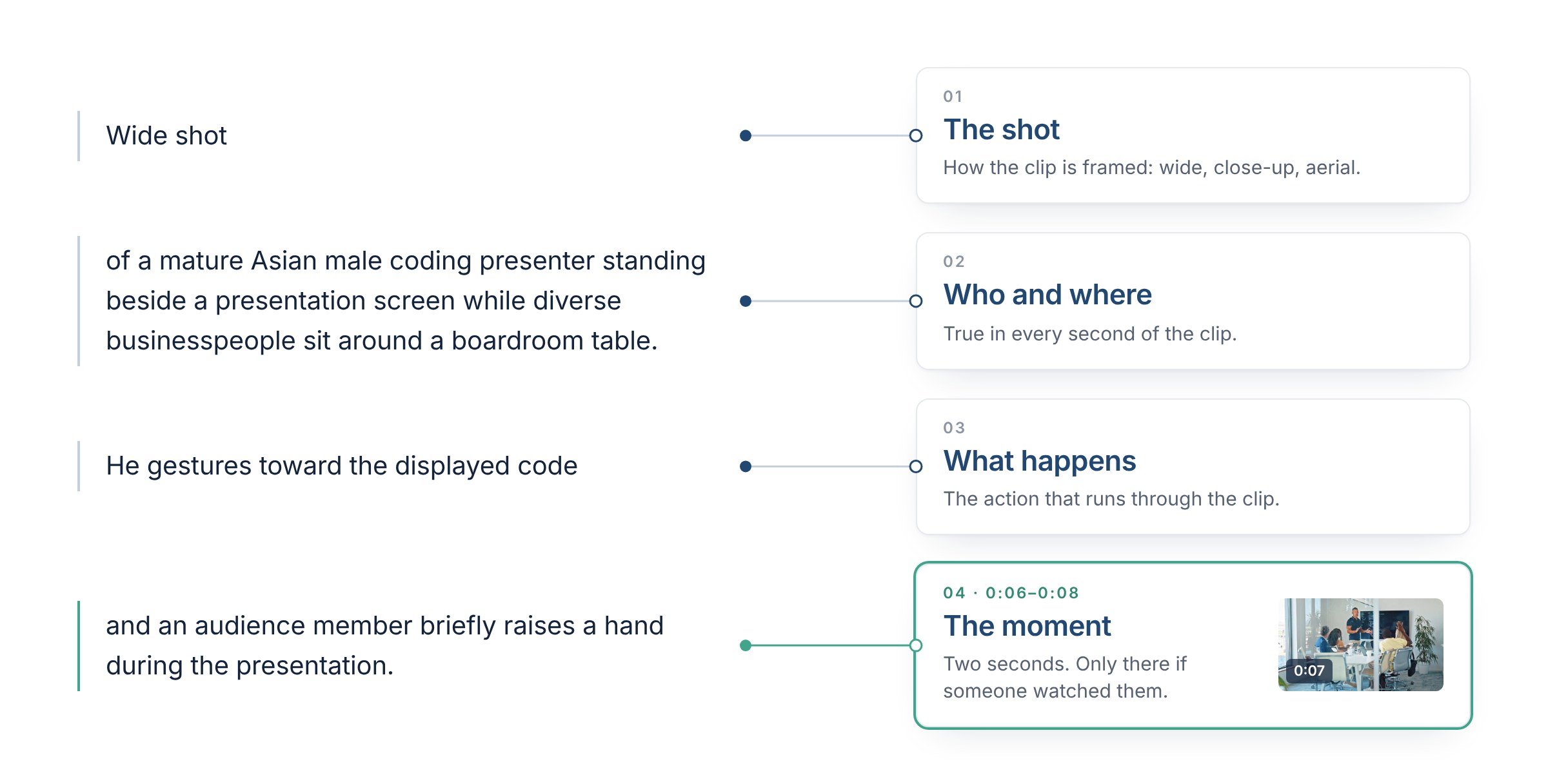
The description of the presentation clip, taken apart. Three parts hold for the whole clip; the fourth depends on two seconds.
A good video description answers four things, usually in one or two sentences:
- The shot. Wide, close-up, aerial. Storyblocks lists unique shot types, such as aerial and drone shots or close-ups, among the things worth putting in a title.
- Who and where. The facts that are true in every second of the clip.
- What happens. The action that runs through it.
- The moment. The short event a buyer may be looking for, which only shows up if someone watched it.
Three stills or the whole clip
Reading three stills, a start, a middle and an end, is a basic, generic AI feature. It treats a clip as three photos, and anything that happens between them is lost: the hand at 0:06, the people walking in, the move that makes the shot.
Stock ImageIQ watches the whole clip and analyzes it in full, start to finish. That's why the description of the presentation says that a hand goes up, and the description of the empty boardroom says who walks in and sits down.
What Stock ImageIQ does with a clip
- It watches and analyzes the entire video, start to finish, not three stills.
- It writes what happens, in the order it happens, including the moments that last two seconds.
- It names the shot, and says how the camera moves when the shot has a move.
- It adds the clip's length as a keyword when you want it. Select your videos, tick Duration keyword, and every selected clip gets one keyword for its length, from Less Than 10 Seconds to 1 Minute or Greater. The 23-second clip above gets 20 Seconds or Greater. Untick the box and the duration keywords are removed again.
- You stay the editor: review every field, reorder the keywords, regenerate with more context, and export.
FAQ
Should the camera move go into the title?
When it defines the clip, yes. A slow push-in toward a building and a still view of the same building are different clips, and an editor who needs the push-in won't find it under the still view. When the move is secondary, keep it in the description, where there's room to say what it reveals.
What if nothing happens in my clip?
Then the description shouldn't invent anything. A lockdown shot of a skyline at dusk is a skyline at dusk, and saying exactly that is honest metadata. Watching the whole clip is also how you know that nothing happens.
Do I need to describe every second?
No. A description that lists every second reads like a log, and the action gets lost in it. Name the shot, who and where, what happens and the moment that matters, in the order it happens.
Sources: Storyblocks: how can I write better titles on my footage clips? · Storyblocks: how can I write better keywords on my footage clips? · Shutterstock: description and keyword best practices.
Three stills is a generic AI feature. Stock ImageIQ watches the whole clip and analyzes it in full, so the description says what actually happens. Try it on your next clip.
Read next: What Stock ImageIQ Is: One Shoot, Every Aisle · How to Write Stock Photo Titles and Descriptions