
Why I Built a Metadata Tool for Stock Contributors
Five years and more than 500,000 photos and videos of stock metadata, and why building a tool to work faster first made me slower. The story behind Stock ImageIQ.

I'm Matic. For more than five years I've written titles, descriptions and keywords for stock contributors: more than 500,000 photos and videos so far. The work arrives as orders. A shoot, a deadline, and a contributor who wants it to sell.
For most of those years, it was typed by hand. And the hardest part was never the typing. It was the tenth near-identical frame in a row, when your focus slips and every photo starts to sound the same.
Then the technology changed, and we caught the first wave. Stock ImageIQ has been in the making ever since. It's not a startup project. No investors, no pitch deck, fully bootstrapped. Just the joy of exploring. Not always joy, to be honest: it's been a journey with huge ups and downs.
The work behind the work
I work closely with established contributors. They know how to shoot. What they rarely have is the time to keyword a 300-photo shoot frame by frame, and to do it in a way that sells.

Four of the shoots we learned from. Photos: azmanl
Working that close to them, and following what actually sells, I kept seeing the same things:
- a whole series with one set of keywords copied onto every frame, all of them competing for the same search;
- titles that describe pixels, “man, woman, computer”, while buyers search for a reason;
- good shoots that never found the buyers they were made for.
I wanted to go faster
I started building an app for one reason: to speed up my own workflow. But faster was never the whole goal. Writing metadata faster is easy. Writing metadata that performs, frame by frame, across a whole series of photos or video clips, is not. I wanted both.
For a long time, I got slower
Getting there took a lot of trial and error. I learned to program. Every batch that came in as an order became a test: I processed it, counted, compared it with what had worked before, and analysed what to change.
So instead of speeding my workflow up, I slowed it down on purpose. The time went into measuring instead of into the next order, so that every future batch, photo or video, would come out better than the last.
The other half of the work happened on calls. Countless calls with campaign managers and video editors, the people on the other side of the search bar, to understand how they actually look for content on stock platforms. What do they type? What makes them click? What makes them move on?
And I worked with many contributors, each with their own rules for their content. Some of those rules went completely against what I knew and what the data showed. "I'm old school, my content needs 50 keywords." Still, I learned something from every single person I worked with, and I'll always be grateful to them. Some of them still work with me today: they report their sales, how fast new content starts selling after upload, what bothers them, and what they notice in general. A lot of what the app does comes from those conversations.
What's inside now
The app carries everything those batches taught us: a large base of data and experience from real orders. What worked, what didn't, and why.
Today it does what I used to do by hand:
- A title, a description and keywords for every photo and video clip.
- A different buyer angle for every frame in a series, so frames reach different buyers instead of competing for the same one.
- Only what is true. What is visible in the frame and what you tell us about the shoot. It never guesses a model's age or ethnicity.
- You stay the editor. Review every field, reorder the keywords, regenerate with more context, and export.
This is the app on a real shoot, the balcony series: one folder, 39 frames, and every frame with its own title and description.
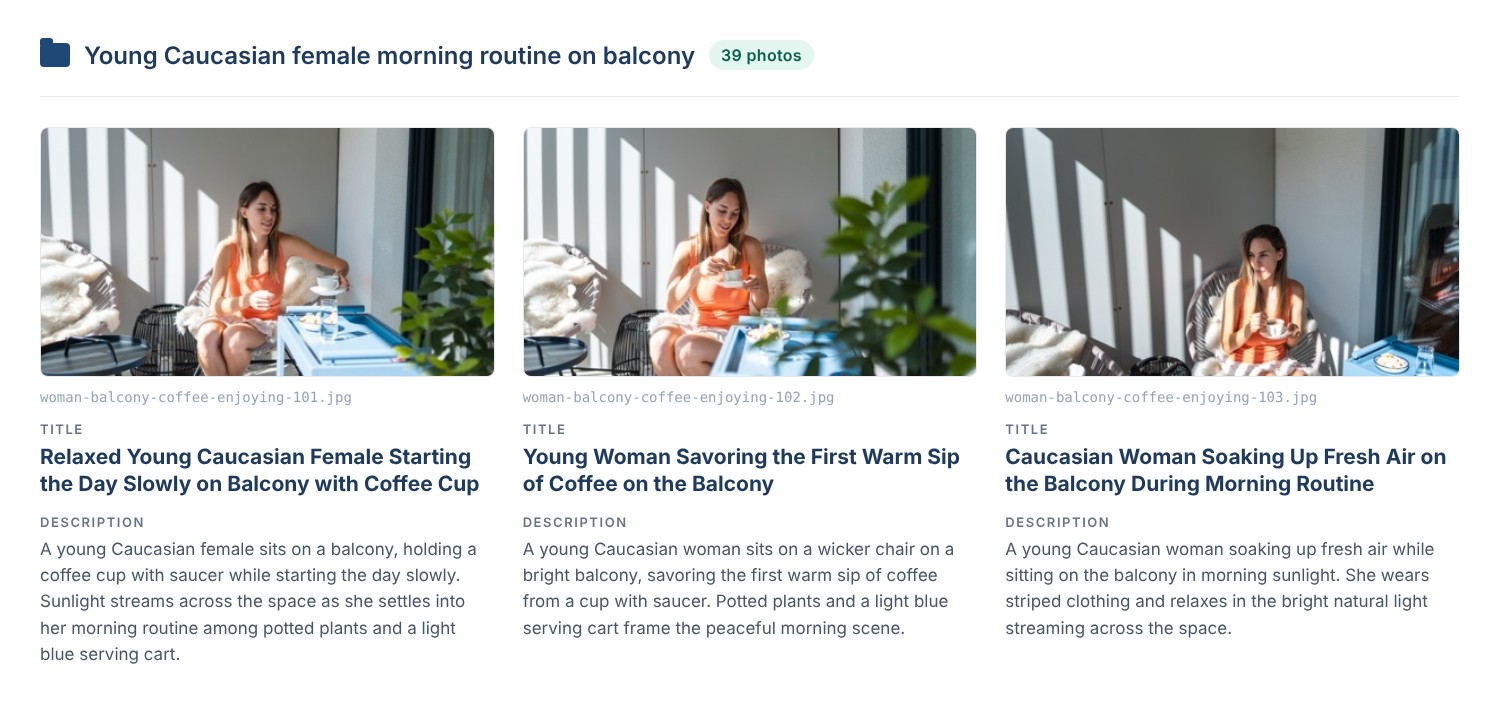
Three of the 39 frames in one folder, each with its own title and description. Photos: azmanl
The keywords change too. Three frames from the same series, same woman, same morning, three different buyers:

Real titles and keywords from a processed shoot. Highlighted: the keywords only that frame carries. Photos: azmanl
Want to see it on your own photos? Try it on your next shoot.
The brain is done. Now come the upgrades.
The core, the part that decides how a shoot gets described, is finished. From here it's about upgrades. In the next few days we'll announce some big ones, to make your workflow smoother, faster and more accurate than ever.
I'm sharing this tool so that the contributors who understand it can use it. Know-how has value. If it didn't, you wouldn't be earning money from your photos either. Our aim is not to be used by the entire stock industry, because in the end, what would happen if everyone had optimised data? That's a good topic for my next post.
Where this is going
The app is the tool. The goal is bigger: a community of stock contributors who work with each other instead of against each other.
I've already run several projects where two or three contributors worked together on the same shoot. Same location, same models, same day. Nobody copied anybody. Each brought a signature skill: a different color grade, a different angle, a different eye for the moment. The result? All of them sell content from the same shoot. The market is huge. You just have to be found.
That is what Stock ImageIQ wants to build around the app:
- Local meetups and shared shoots, so contributors in the same area can plan projects together.
- Partnerships with businesses that open new locations to shoot in.
- Education: webinars and round-table panels on what sells, what doesn't, and why.
- And yes, the occasional party. This work is better with people around you.
If you'd like to be part of it, follow along on the blog and on Instagram. More soon.
Where to start
Everything I write on this blog comes from the same work: real shoots, real numbers, and what I've seen sell. If you're new here, start with these:
- Positioning, not luck: how stock search turns metadata into clicks and sales
- Same keywords on every photo? Your series is competing with itself
- Keyword weight: why niche keywords win
- How to write stock photo titles and descriptions
And if you'd rather hand the keywording off, try it on your next shoot.