
How to Generate Metadata for Shutterstock (2026 Guide)
Shutterstock metadata step by step: a headline-style description per file, 7 to 50 relevant keywords, one category, and similar frames kept apart.
To generate metadata for Shutterstock, write one description per file that reads like a short headline: who, what, where, when and why, with the angle and focus of that exact frame. Shutterstock has no separate title field, so the description is your title. Then add between 7 and 50 keywords that relate directly to that file, choose one category (a second is optional), and keep trademarks and camera information out of commercial content. For a series, every frame needs its own description and its own specific keywords: Shutterstock rejects content that is too similar, and identical metadata makes similar frames compete for the same search.
One thing up front: good metadata makes good content findable. It does not make weak content sell, and we do not promise more sales.
What Shutterstock asks for
These are Shutterstock's own rules, checked on 6 November 2026, next to how we apply them.
| Field | Shutterstock's rule | How we apply it |
|---|---|---|
| Description (your title) | A sentence or phrase, not a keyword list, like a news headline. Answers who, what, when, where and why, and uniquely identifies the file, including its angle and focus. Up to 2,048 characters. | One or two sentences per file, the most important part first, no two descriptions alike in a shoot. |
| Number of keywords | Between 7 and 50. | As many as are truly relevant, never padding. |
| Keyword content | Directly related to what the file shows or represents, tailored to each file. Specific words and compound terms plus broader topics, feelings and concepts. | Specific frame terms first, then shared shoot facts, then concepts. |
| What to avoid | Repeated words, links, camera information, emojis, spelling and grammar errors, spam. Trademarks only on relevant editorial content. | We strip brands, camera names and file-name text from commercial files. |
| People | Respectful and accurate when describing identities. No personally identifiable information. | Age group, gender and number of people from the shoot brief, never guessed names. |
| Categories | One required, a second optional. | One fitting category per file. |
| Editorial | Documentary editorial descriptions include the day, month and year taken plus the location. Wrong or missing year or location is a rejection reason. | Editorial captions are written from the facts you give, never invented. |
| Language | English, except scientific Latin names, place names and common foreign terms. | English. |
| Similar content | Rejected when it is too similar to something already submitted or published. Allowed exceptions include one horizontal and one vertical version, or one color, one black-and-white and one filtered version. | Distinct descriptions and keywords per frame, and a cull before upload. |
Step by step: Shutterstock metadata for a whole shoot
- Write the shoot brief first. Who is in it (how many people, age groups, roles), what happens, where and when. For editorial content, also the exact date and location, because Shutterstock rejects documentary editorial files without them.
- Group the files by scene and cast. In Stock ImageIQ, Sort for you proposes these folders from the brief; nothing moves until you confirm.
- Find the angle of each frame. What does this frame show that its neighbour doesn't? The action, the number of people, the framing, the focus object, the emotion. For video, the camera motion and what happens during the clip.
- Write the description as a headline for that frame. Start with the subject and the angle, then add the where and when. One or two sentences is enough; Shutterstock wants a sentence, not a list of keywords.
- Choose the keywords for that frame. At least 7, at most 50, all of them related to what the file shows. Shutterstock does not say that keyword order matters, but we still lead with the specific terms, so the same file works on agencies where order does matter.
- Check before export. No trademarks or camera information on commercial files, no repeated words, no spelling errors, no emojis. No two descriptions alike in the shoot. Ages, number of people and location consistent across the series.
- Pick one category (and a second if it genuinely fits), mark editorial files, then export the Shutterstock CSV. Note that the CSV has no title column: the description is the title.
- Cull before you upload. Shutterstock does not accept flipped, cropped or re-proportioned versions of the same image, many tone or filter variations of it, or the same pose with minor framing changes. If two frames would need the same description, upload the stronger one.
Similar images compete with each other: five frames, five descriptions
A shoot is a series. Ten frames of the same person in the same place are normal, and a buyer may need any one of them. The problem starts when all ten go out with the same description and the same keywords. Then every frame answers the same search, the results fill with near-identical files, and none of them reaches the buyers searching for the other moments in the shoot. That is cannibalization: your own files fighting each other for one search instead of covering many.
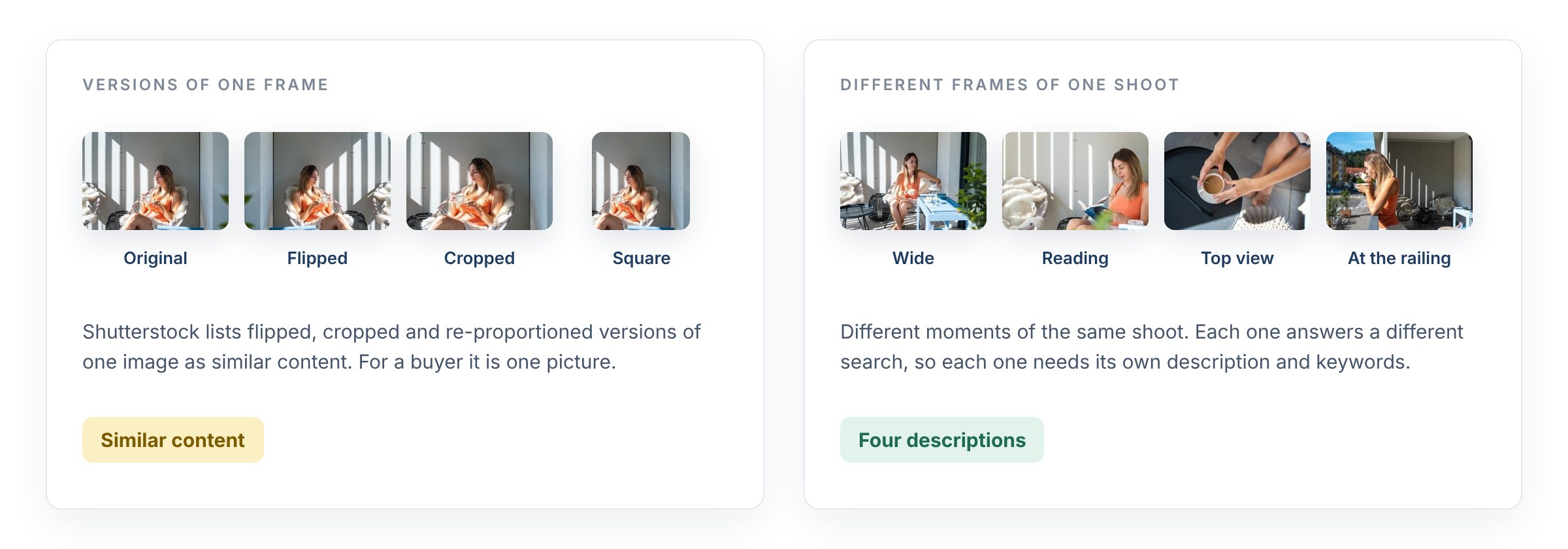
Versions of one frame are one picture for a buyer; different frames of the shoot are four. Photos: azmanl
Shutterstock's similar content policy exists for the same reason: to keep search results from filling with near-identical files. If the frames really are different, the metadata has to show it. Five frames from the same balcony shoot, each with its own description:
| Frame | Description |
|---|---|
| 1. Wide | Young woman sitting at a small table with a cup of coffee on a sunny balcony |
| 2. Medium | Woman holding a cup and saucer in a wicker chair in soft morning light |
| 3. Reading | Young woman reading a book in a wicker chair next to a sheepskin throw |
| 4. Top view | Top view of hands holding a coffee cup on a black side table |
| 5. At the railing | Woman sipping coffee at the balcony railing above a quiet city street |
Each description answers a different search. The shared facts (balcony, city apartment, morning, summer, one young woman) stay in every file's keywords, so the series still holds together.
What our data shows. We measured 19 real shoots (1,577 files) processed with Stock ImageIQ. In 77% of the files, the set of the first 10 keywords (order ignored) appeared on no other file from the same shoot. Of all the keywords two files from the same shoot use between them, about two fifths appear on both: the shared facts stay, the rest changes. This counts keywords, not buyer searches or sales. More on this, with a full series: Same Keywords on Every Photo? Your Series Is Competing With Itself.
What we learned working with top contributors
The rules behind Stock ImageIQ were built with top contributors, from their confirmations and suggestions, and checked against measured results and sales. These are the ones that matter most for Shutterstock:
- The description does two jobs. On Shutterstock it is both the title buyers read and text the search reads. Write it for a person first: a clear headline of what happens in the frame.
- Facts before style. A wrong age group, species or city does more damage than a missing adjective. Buyers filter on facts.
- Keep the series consistent. If the brief says two people in their thirties, every frame says the same. Contradictions inside one shoot look careless to a reviewer.
- Describe situations, not object lists. "Father teaching daughter to ride a bike in the park" tells a buyer more than "bicycle, girl, man, park".
- Concepts only when you can see them. "Teamwork" belongs on a frame where people visibly work together. Concepts you can't see are irrelevant metadata, a named rejection reason.
- Editorial is a different job. Date, place and what actually happened, written plainly. No guesses, no marketing words.
- Video has its own vocabulary. Camera motion (aerial, tracking shot, slow motion), what happens in the clip, and when the action changes, the action that lasts longest. Shutterstock does not want the same clip in several lengths or camera moves, so each clip you keep should describe its own moment. More in Does Your Keywording Tool Watch the Whole Clip?
- Nothing from outside the frame. Camera brands from file names, the client's name, the agency's name: none of it describes the picture, and on commercial content it breaks the trademark rule.
- Don't chase 50. Padding the list with weak words adds no searches. It adds rejection risk.
What metadata cannot do
We don't promise more sales, and no metadata tool honestly can. Sales start with content buyers need: a clear subject, a commercial use, technical quality, valid releases and a topic that isn't already covered by thousands of similar files. That is the precondition. Metadata comes after it.
What metadata does decide is whether a good file is found for the searches it deserves, and whether a series is accepted instead of rejected as similar content or irrelevant metadata. If an image does not sell with accurate, distinct metadata, the answer is usually in the image or the topic, not in the keywords.
What we can measure, we publish: whether each file is described correctly and differently from its neighbours. Our next measurement counts every manual correction an experienced contributor makes across 2,309 files from 38 shoots.
FAQ
How many keywords does Shutterstock allow? Between 7 and 50 per file. Use only keywords that relate directly to what the file shows.
Does Shutterstock have a title field? No. The description is the title. Write it as a short headline that answers who, what, where, when and why.
How long can a Shutterstock description be? Shutterstock's metadata standard allows up to 2,048 characters, but one or two clear sentences work better than a long paragraph.
Does keyword order matter on Shutterstock? Shutterstock's keyword guide does not say that it does. We still put the most specific terms first, so the same metadata works on agencies where order matters.
Can I use the same description for similar photos? Not if you want them all to work. Shutterstock asks for descriptions that uniquely identify each file, and it rejects content that is too similar to what you already submitted.
Can I use brand names in Shutterstock keywords? Only on relevant editorial content. Commercial titles and keywords cannot include brand or product names.
What does an editorial description need? For documentary editorial content: the day, month and year the image was taken and the location, plus what happened. A wrong or missing year or location is a rejection reason.
Will better metadata increase my sales? We don't promise that. Metadata helps good content get found and accepted. Whether it sells depends first on the content itself.
Can Stock ImageIQ generate Shutterstock metadata for me? Yes. It reads the whole shoot, writes a description and keywords for each file, and exports a ready Shutterstock CSV. With the Stock ImageIQ desktop app for macOS, it also writes the metadata straight into your original photos, so it travels with every file:
- Title → XMP
dc:titleandphotoshop:Headline, plus IPTC-IIM Object Name and Headline - Description → XMP
dc:description, IPTC-IIM Caption-Abstract and EXIF ImageDescription - Keywords, in their order → XMP
dc:subjectand IPTC-IIM Keywords
JPEG and TIFF files get both XMP and IPTC-IIM. PNG and WebP get XMP only, because those formats have no IPTC-IIM block. XMP always carries the full text; the IPTC-IIM copies respect that standard's byte limits. Every other field in the file stays untouched. The Mac app uploads a copy of each photo at most 1280 px on its long side for analysis (small photos and GIF or BMP files are uploaded as they are), then writes the title, description and keywords back into the originals on your disk. For videos, the app saves a metadata CSV next to the clips.
A photo uses 1 credit and a video uses 3 credits. On the largest pack a credit costs under €0.10 (excl. VAT). See pricing or download the desktop app.
Sources: Description and keyword best practices · Content Publishing Standards: Contextual Metadata · Why was my content rejected for similar content?
Read next: How to Generate Metadata for Adobe Stock (2026 Guide) · How to Generate Metadata for Getty Images and iStock (2026 Guide)