
How to Generate Metadata for Getty Images and iStock (2026 Guide)
Getty Images and iStock metadata step by step: precise keywords mapped to the controlled vocabulary, facts first, and similar frames kept apart.
To generate metadata for Getty Images and iStock, write precise keywords for what is strongly visible in each file and let Getty's controlled vocabulary do the rest. Every keyword you submit maps to a vocabulary term that already carries synonyms, broader terms and translations, so you don't need to add those yourself. What you do need: the number of people, one age and one gender term per visible person, the most specific location plus broader ones, the action, and only the concepts a buyer can actually see. Use words with one clear meaning, keep model names, brand names and unsupported ethnicity terms out of royalty-free files, and give every frame in a series its own specific keywords, so similar files don't compete for the same search.
One thing up front: good metadata makes good content findable. It does not make weak content sell, and we do not promise more sales.
What Getty Images and iStock ask for
These are Getty's own rules from its keywording guide for contributors, checked on 6 November 2026, next to how we apply them. Character limits for each field are set in Getty's metadata template in ESP, the contributor portal.
| Topic | Getty's rule (in short) | How we apply it |
|---|---|---|
| Controlled vocabulary | Each keyword maps to a vocabulary term with hidden synonyms, broader terms and translations, so a file is found by words you never typed. | We don't spend slots on synonyms, plurals or translations. |
| Words with two meanings | Getty keeps separate terms for each meaning plus an "ambiguous" one. Submit a phrase that points to one meaning. | "Crane bird" or "construction crane", never just "crane". |
| Multi-word terms | Keep recognized phrases together; split combinations that are not real phrases; avoid color plus object unless it is a known phrase. | "Looking at camera" stays one keyword; "walking outdoors" becomes two. |
| Quality over quantity | Keyword what is most strongly visible. A buyer should see at once why the file appeared. | Every keyword must be visible or clearly implied in the frame. |
| People | One age and one gender term per clearly visible person, specific age range if known; exactly one number-of-people term; background people as incidental people. | Taken from the shoot brief and checked against each frame. |
| Ethnicity | Only when the model release states it. Without a release, no ethnicity terms. | Never guessed from the picture. |
| Names and brands | No model names on royalty-free files. Brand and business names only on specific rights-managed content; otherwise generic terms. | Generic terms only, no camera or client names. |
| Animals | Common name plus Latin name if known, the most specific name possible, number of animals; family and young-animal terms instead of human ones. | Exact species, never a guess between two. |
| Places | The most specific location, plus broader region and country if it is obscure; never conflicting places. | City, region, country, in that order of importance. |
| Video | Keyword like images, plus technique (tracking shot, pan, zoom, time lapse), duration and whether there is sound. | Camera motion and duration on every clip. |
| Characters | No diacritics, quote marks, brackets or special symbols in keywords. | Cleaned at export. |
Step by step: Getty and iStock metadata for a whole shoot
- Write the shoot brief first. How many people, their age groups and roles, what happens, where and when. Add ethnicity only if your model releases state it. These facts are the same for every frame, so decide them once.
- Group the files by scene and cast. In Stock ImageIQ, Sort for you proposes these folders from the brief; nothing moves until you confirm.
- Start each file with the facts. Number of people, one age and gender term per visible person, the location from specific to broad, indoors or outdoors, time of day.
- Add what this frame shows. The action, relationships and roles, the objects that matter, the composition (close-up, high angle view, flat lay) and, for video, the camera technique and duration. This is where frames from the same shoot differ.
- Add concepts and moods you can see. Only the ones a buyer would recognize in the frame at a glance.
- Make every keyword unambiguous. Replace words with two meanings by a phrase with one. Keep recognized phrases together and split the ones that are not real phrases.
- Check before export. No model names, no brand names, no ethnicity without release support, no conflicting places, no special characters. Words like "nude" flag a file for Getty's nudity filter, so use them only when they are true.
- Write a clear title or headline, then export and submit through ESP.
- Test after publishing. Getty suggests searching a keyword together with the file ID: if the file shows up, it is searchable by that keyword, even when the keyword is not visible on the site. New files can take up to 3 days to appear in search.
Similar images compete with each other, even more inside a controlled vocabulary
The controlled vocabulary is a strength: one precise keyword brings synonyms, broader terms and translations with it. But it also multiplies sameness. If twenty frames from one shoot carry the same keyword set, they don't just share twenty words. They share every synonym and broader term behind those words, in every language, so they match exactly the same searches everywhere. The vocabulary cannot tell your frames apart if your keywords don't.
That is cannibalization: your own files competing for one search, while the searches for the other moments of the shoot find nothing of yours. Getty's own test helps here. A buyer should understand immediately why a file appeared for their search. With identical keywords, that is true for one frame of the series and false for the rest.
The fix is the same on every agency: keep what the frames share and change what they don't. Three frames from one real family shoot:
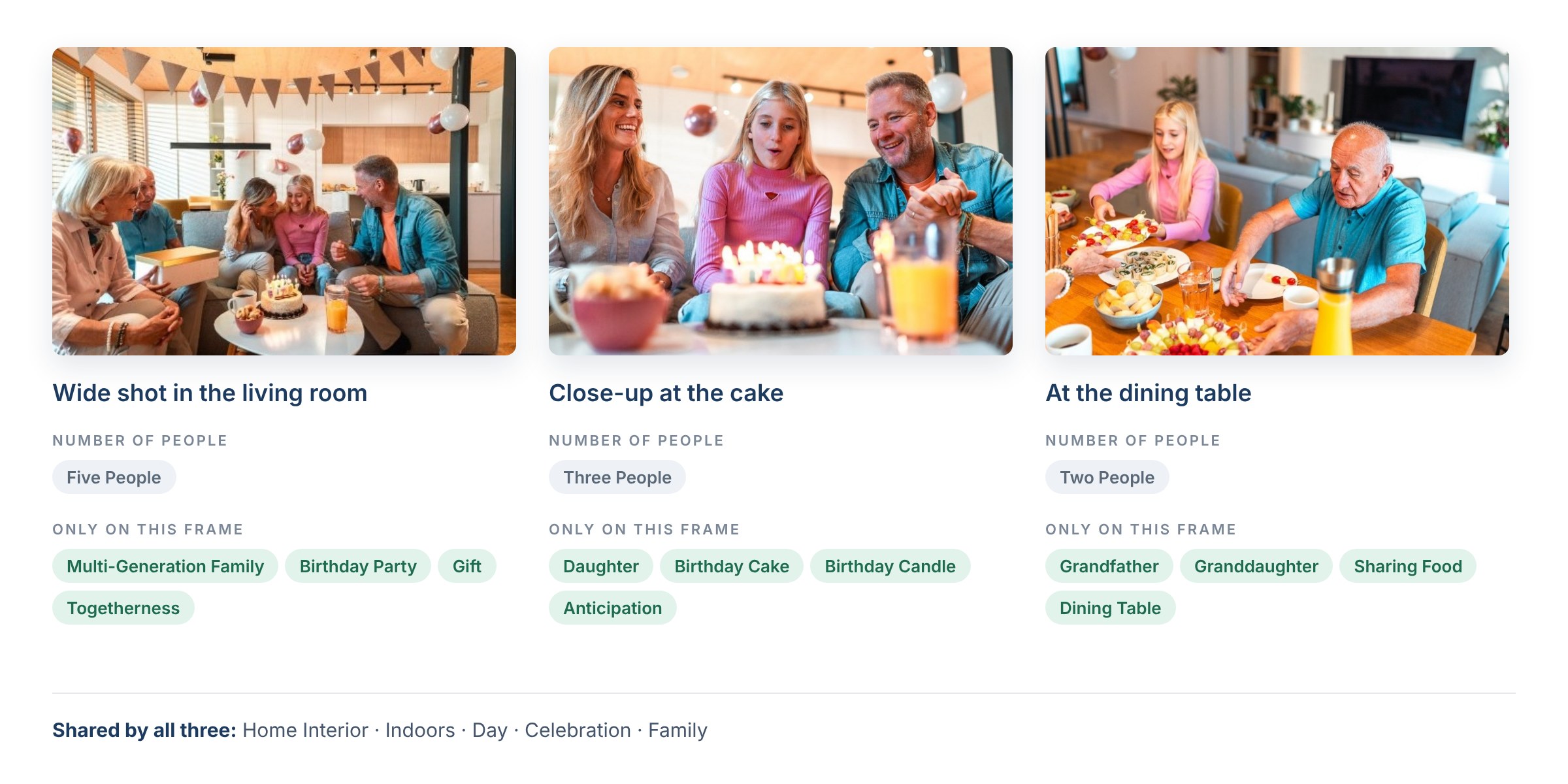
Same family, three frames, three sets of facts. Keywords are examples in Getty-style terms. Photos: azmanl
The same in text (simplified):
| Frame | What this frame shows (the keywords that differ) |
|---|---|
| Wide shot in the living room | Five people: multi-generation family, birthday party, gift, togetherness |
| Close-up at the cake | Three people: daughter, birthday cake, birthday candle, anticipation |
| At the dining table | Two people: grandfather, granddaughter, sharing food, dining table |
All three keep the shared facts in their keywords: home interior, indoors, day, celebration, family. Even the number of people is a fact of the frame, not of the shoot: five, three and two people here, and Getty asks for exactly one number-of-people term per file. The specific terms are what let each frame answer its own search.
What our data shows. We measured 19 real shoots (1,577 files) processed with Stock ImageIQ. In 77% of the files, the set of the first 10 keywords (order ignored) appeared on no other file from the same shoot. Of all the keywords two files from the same shoot use between them, about two fifths appear on both: the shared facts stay, the rest changes. This counts keywords, not buyer searches or sales. More on this, with a full series: Same Keywords on Every Photo? Your Series Is Competing With Itself.
What we learned working with top contributors
The rules behind Stock ImageIQ were built with top contributors, from their confirmations and suggestions, and checked against measured results and sales. These are the ones that matter most for Getty Images and iStock:
- Facts are the backbone. Getty's vocabulary is built around facts buyers filter on: how many people, which ages, where. A wrong fact here does more damage than on any other agency, because it travels with every synonym and translation.
- One person, one age, one gender. Count the people who are clearly visible and give each of them exactly one age and one gender term. Background people are incidental, not part of the count.
- Ethnicity comes from the release, never from the picture. Our tool writes ethnicity only when you give it in the shoot brief, which should come from your releases.
- Wildlife needs a naturalist's precision. The exact species, the Latin name when you know it, the number of animals and what they are doing. A guess between two similar species is worse than the broader term.
- Describe situations, not object lists. A buyer searching for a grandfather sharing food with his granddaughter wants that moment. The action and the relationship are often the keywords that separate one frame from the next.
- Concepts only when you can see them. The vocabulary will broaden your words for you. If you add concepts that aren't visible, it broadens those too, and the file appears where it doesn't belong.
- Video has its own vocabulary. Camera technique, duration and sound, and when the action changes during a clip, the action that lasts longest. More in Does Your Keywording Tool Watch the Whole Clip?
- Nothing from outside the frame. Camera brands from file names, the client's name, model names: none of it belongs in royalty-free metadata.
What metadata cannot do
We don't promise more sales, and no metadata tool honestly can. Sales start with content buyers need: a clear subject, a commercial use, technical quality, valid releases and a topic that isn't already covered by thousands of similar files. That is the precondition. Metadata comes after it.
What metadata does decide is whether a good file is found for the searches it deserves, in every language the vocabulary covers, and whether each frame of a series earns its own place in the results. If an image does not sell with accurate, distinct metadata, the answer is usually in the image or the topic, not in the keywords.
What we can measure, we publish: whether each file is described correctly and differently from its neighbours. Our next measurement counts every manual correction an experienced contributor makes across 2,309 files from 38 shoots.
FAQ
What is Getty's controlled vocabulary? A structured list of search terms. Each keyword you submit maps to one term, and that term already carries synonyms, broader terms and translations, so your file can be found by words you never typed.
Do I need to add synonyms, plurals or translations? No. The vocabulary adds them. Use your keyword slots for facts and for what is specific to the frame.
How many keywords should I use on Getty Images and iStock? Getty asks for quality over quantity: keyword what is most strongly visible, so a buyer understands at once why the file appeared. Field limits are set in the metadata template in ESP.
Can I add ethnicity keywords? Only when the model release states the ethnicity. Without that, ethnicity terms cannot be applied.
Can I use model names or brand names? Not on royalty-free content. Use generic terms instead, such as smart phone instead of a brand.
How do I check that my file is searchable by a keyword? Search for the keyword together with the file ID. If the file appears, it is searchable by that keyword, even if the keyword is not shown on the site.
Why doesn't my new file show in search? Approved files can take up to 3 days to appear. Also check the site filters: editorial files and files flagged by the nudity filter can be hidden.
Will better metadata increase my sales? We don't promise that. Metadata helps good content get found. Whether it sells depends first on the content itself.
Can Stock ImageIQ generate Getty and iStock metadata for me? Yes. It reads the whole shoot, writes a title, a description and facts-first keywords for each file, and exports a CSV for submission. With the Stock ImageIQ desktop app for macOS, it also writes the metadata straight into your original photos, so it travels with every file:
- Title → XMP
dc:titleandphotoshop:Headline, plus IPTC-IIM Object Name and Headline - Description → XMP
dc:description, IPTC-IIM Caption-Abstract and EXIF ImageDescription - Keywords, in their order → XMP
dc:subjectand IPTC-IIM Keywords
JPEG and TIFF files get both XMP and IPTC-IIM. PNG and WebP get XMP only, because those formats have no IPTC-IIM block. XMP always carries the full text; the IPTC-IIM copies respect that standard's byte limits. Every other field in the file stays untouched. The Mac app uploads a copy of each photo at most 1280 px on its long side for analysis (small photos and GIF or BMP files are uploaded as they are), then writes the title, description and keywords back into the originals on your disk. For videos, the app saves a metadata CSV next to the clips.
A photo uses 1 credit and a video uses 3 credits. On the largest pack a credit costs under €0.10 (excl. VAT). See pricing or download the desktop app.
Sources: Getty Images Content Partners keywording guide · Reasons why files may not show in search results
Read next: How to Generate Metadata for Adobe Stock (2026 Guide) · How to Generate Metadata for Shutterstock (2026 Guide)