
Three Prompts Can Build a Keywording App. Can They Position Your Photos?
AI can describe a stock photo in seconds. Getting it found by the right buyer is another job. What years of done-for-you metadata taught us.
Since 2021 I have worked as a metadata partner for contributors with very large portfolios. It is a done-for-you service: they shoot, we write the titles, descriptions and keywords. Across those portfolios, I have written or supervised the metadata for more than 500,000 files so far. The quality of their photos and videos is not the question. My job is exposure, and through exposure, sales. Metadata can't force a sale. But it decides whether the right buyer ever gets a chance to see the photo.
If I did that job badly, they would stop working with me. Or I would stop working with them. This post is about why metadata matters that much, and why "I can build that with three prompts" misses the point.
Metadata is a sales factor, not paperwork
A partner with a large portfolio doesn't judge me by how my titles read. They judge me by what happens after upload: how many files get seen, how many get downloaded, how fast, and where.
The photos are already good. What decides whether a buyer ever sees them is the text around them: the title, the description and the keywords the search engine reads.
So every batch I process gets measured before it goes out. I keep internal benchmarks, compare each batch against them, and check the output by hand where the numbers say something is off. That habit came from the service years, and it is built into Stock ImageIQ today.
Can three prompts build a keywording app? Of course
There is a popular idea that three prompts to an AI model give you a keywording app. Can that work? Yes. You will get output: a title, a description, fifty keywords, in seconds.
The real question is whether that output sells. To know what to write, a program needs to know what has worked and what hasn't: which words contributors kept, which they corrected, and why. Three prompts can build a keyword generator. They don't give it rules built from years of contributors' corrections and tested batch after batch. Without those, it can only describe what it sees.
And describing pixels is the easy part. "Woman, kitchen, digital tablet" is true for thousands of files. The days when describing a photo was enough are over.

Here is the difference on one real photo from a gaming shoot: a young couple at a computer, working through a problem together.
A generic tagger writes something like "Man and woman using computer", with keywords such as gaming, computer, headphones, man, woman, technology (an example, not real output). Nothing in it is wrong. It just puts the photo into the same searches as thousands of other files.
The title we wrote for it:
Focused Young Diverse Couple Solving a Stubborn Glitch Together at Computer
Its keywords include guidance, problems, teamwork, learning and couple - relationship (the agency vocabulary's own term). Now the same photo can serve an IT helpdesk looking for problems and teamwork, an online course looking for learning and guidance, and a relationship blog looking for a couple.
The same goes for a whole shoot. One recent family shoot had 325 photos. Instead of one keyword list for all of them, they went into 45 groups by who is in each frame, and every frame got its own title and keywords: a girl with her parents is a daughter, the same girl with her grandfather is a granddaughter.
Finding those buyers, frame by frame, is what Stock ImageIQ is built for. See how it works.
Buyers are starting to search through assistants
Search itself is changing. Shutterstock launched an app in ChatGPT in April 2026 and a connector for Claude in August 2026. A buyer can now ask an assistant to search the library for them, without opening the agency's website.
That buyer doesn't type "woman in kitchen using digital tablet". They describe what they need: a campaign, a business function, a feeling. The assistant turns that brief into searches for concepts.
If your metadata only lists what is visible, it has little to match. If it names what the frame is about, it does.
Why a keyword list of every job title backfires
The common answer is to add everything a buyer might want: manager, CEO, lawyer, insurance agent, real estate agent, project manager, analyzing, creativity, determination, success.
It feels like more chances. In practice, each of those words loses weight:
- They compete with each other. One woman with a tablet can't be a lawyer, an insurance agent and a CEO at once. A search engine that reads the whole file sees a photo that claims to be everything.
- They compete with your own portfolio. If fifty similar frames carry the same list, they all wait for the same searches, and the buyer picks one.
- The title and description don't back them up. A keyword that appears nowhere else in the metadata is a weak signal.
- The wrong buyer clicks and leaves. Someone looking for a real estate agent opens the photo, doesn't find one, and goes back. Adobe Stock says it plainly: irrelevant keywords can hurt your visibility.
We covered the mechanics in Keyword Weight and Positioning, Not Luck. The short version: fewer words that are true, specific and backed by the title beat a long list that is not.
One search on iStock, three answers
Here is what that looks like in numbers. I ran three searches on iStock on 6 November 2026 (screenshots below):
| Search | Results |
|---|---|
| businesswoman in office using digital tablet | 168,132 |
| female business executive in modern office using digital tablet | 90,562 |
| mid adult asian businesswoman analyzing data and measuring success in office using digital tablet | 1 |
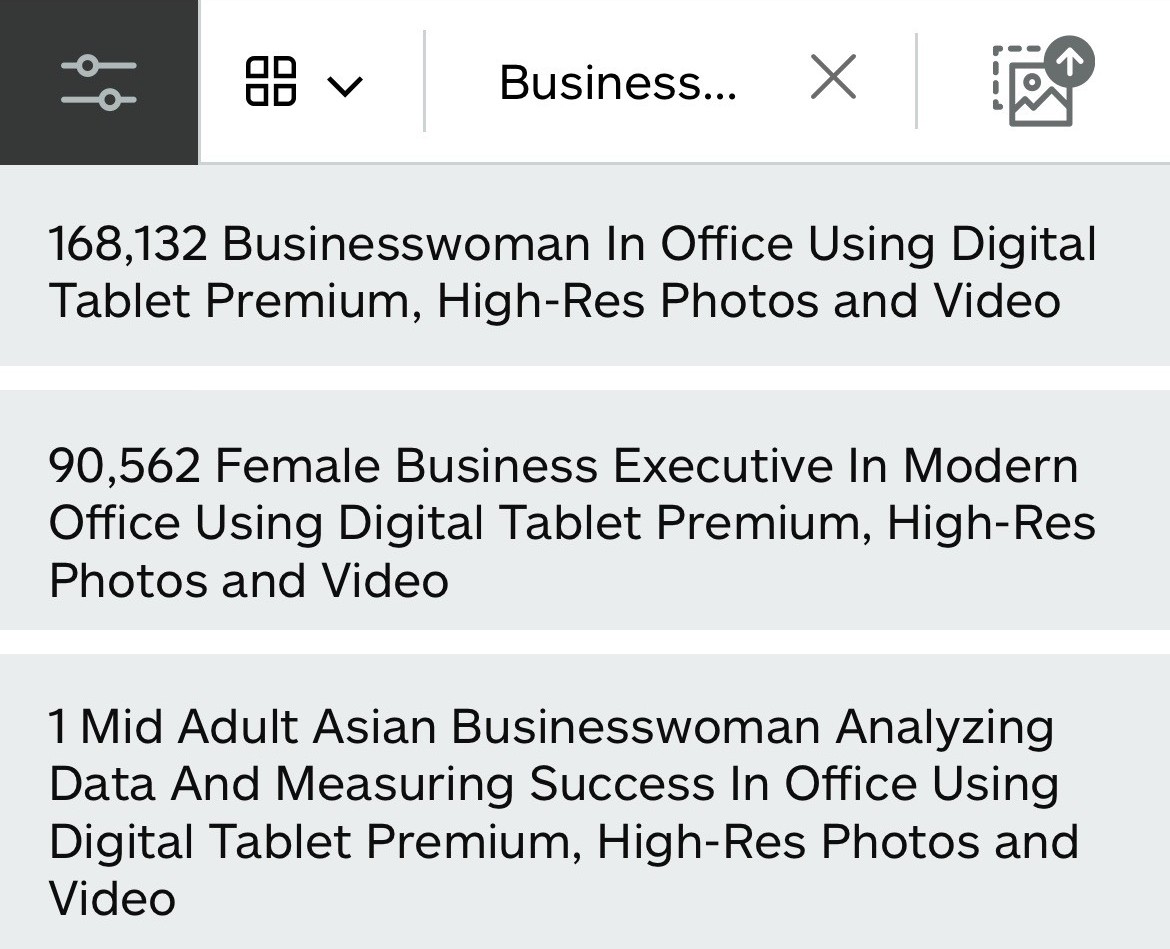
Our own iStock searches, 6 November 2026.
The first line is how most tools describe the photo. Rewording the same idea cuts the field almost in half, but you still compete with more than 90,000 files.
The third line is built differently. It names who (a mid adult Asian businesswoman), the action (analyzing data), the concept (measuring success), the place (an office) and the object (a digital tablet). Every part is true for the photo, and together they leave one result: a photo whose metadata we wrote.
To be fair, two things. The number of results shows how crowded a search is, not how many sales a file will make. And nobody types that whole sentence. Buyers type shorter combinations, such as asian businesswoman analyzing data, businesswoman measuring success or mid adult businesswoman with tablet, and an assistant working from a brief combines ideas the same way. Each idea narrows the field to the files that actually carry it, and a photo that truly carries all of them can show up in every one of those searches.
As a serious creator, that is where you want to be.
The only part of stock search you control
You can't buy a better position on a stock agency, and you can't change how its search ranks files. The one part of search you do control is your metadata. For a stock contributor, it is the only SEO in your hands, and the only one that can raise your sales.
Think of a web shop that pays for an ad to sit at the top of the results. Good metadata does the same job for your files, with two differences: you pay once per file, not per click, and the position comes from being the right answer, not from the highest bid.
No tricks: interpretation and positioning
None of this is about gaming the search. Nothing in that third title is invented. It is the same photo, read properly and placed in the searches where it belongs: who is in it, what they are doing, and why a buyer would need it.
That is also why our tool is not for everyone. It is for contributors who understand how the system works. Getting it right takes time: development, measuring results, and adjusting to new trends and to how agencies change their search.
Most tools describe photos. Few position them.
Describing pixels is something many keywording tools do well.
For smart positioning, most generic tools fall short. They don't carry the corrections contributors have made across a portfolio: what was wrong, what was missing, and why. And what they charge you little for, you can do yourself in any AI chat window.
AI can see the photo. It can't see the buyer.
If you believe AI knows everything, let me disappoint you: it doesn't. Least of all about people.
A model can see a woman with a tablet. It can't know which expression makes an art director stop scrolling, or why a contributor keeps the title of one family dinner frame and rewrites the next. That knowledge comes from contributors' corrections, batch after batch.
We are not here to take your money. We are here to bring you more of it, along the path of least resistance.
If cheap and fast metadata is the goal, why shoot at all?
If you want your metadata as cheap and as fast as possible, ask yourself one question: then why not generate the photos with AI too?
You know the answer. You shoot because real people, real light and real moments are worth something, and buyers pay for that. You spent days on the casting, the shoot and the edit, and real money on gear: camera makers spend years on sensors, lenses and autofocus, and you pay for it because it shows in your work. I don't know a single professional who makes quality content with a $49.99 action camera.
Metadata deserves the same standard. It is the lens buyers see your work through, and the only part of your work they read before they see it.
If speed is all you want: four steps
Stock ImageIQ has that too: four steps from a raw shoot to metadata in your files. Not because we cut corners, but because we did the preparation first.
Every serious creator writes a shoot plan before the shoot, instead of photographing everything in sight and hoping something sells. Metadata works the same way. Your two lines, the shoot brief and the cast, are the plan for your shoot. The rules behind them are the preparation we did, so you don't have to. In Stock ImageIQ, the four steps look like this:
- Drop your shoot. A folder, photos or videos. Your originals stay where they are.
- Write two lines. What the shoot is about and who is in it. Sort for you (beta) proposes folders by who, what and where, and nothing moves until you approve.
- Generate. Every file gets its own title, description and keywords, the strongest first.
- Review and write. Edit anything and regenerate any file once for free. Then write the metadata straight into your photos with the free Mac app, or export a CSV for your agency.
The full walkthrough is a short video on our homepage.
This product is my bread
Stock ImageIQ is not a side project. It is how I make a living. If the output is bad, my partners leave, and there is no bread.
That is why every batch gets measured, and why the system keeps changing when the numbers say it should.
Matic Andoljšek, founder
FAQ
Is AI keywording good enough for stock photos?
For describing what is visible, often yes. For placing a file in searches where it can win, it takes more than a model: rules built from contributors' corrections, each agency's vocabulary, and someone who checks the result.
Should I add every job title that might fit?
No. Use the roles that are true for the photo and match your notes on the cast. A list of every possible role dilutes the ones that are true, and Adobe Stock warns that irrelevant keywords can hurt your visibility.
Do long, specific titles help?
A title should name who, what and why in plain words; the length follows from that. Agencies set their own limits, so the strongest words go first.
Sources: Shutterstock launches licensed content app in ChatGPT (1 April 2026) · Shutterstock: LLM integrations (ChatGPT and Claude) · Shutterstock adds a connector to Claude (13 August 2026) · Adobe Stock: Keywording cheat sheet · iStock search results: our own searches, 6 November 2026.
Want to see what your next shoot looks like with metadata built this way? New accounts get 50 free credits, no card needed. Start here.
Read next: Why I Built a Metadata Tool for Stock Contributors · Positioning, Not Luck: How Stock Search Ranks Files by Keywords and Clicks